Azure landing zone implementation is the foundation every mid-size company needs before moving workloads to Microsoft's cloud. Without it, teams end up with shadow IT, sprawling resource groups, inconsistent security policies, and Azure bills that nobody can explain. The consequences of skipping it are entirely business-level: compliance failures, cost overruns, and migrations that take three times longer than projected.
This guide explains what a landing zone is, why the design phase matters more than the migration itself, and how mid-size companies in healthcare, logistics, banking, and supply chain can get it right the first time. Whether you're starting your azure infrastructure assessment or already deep in planning, the sections below give you a practical framework for decisions that actually stick.
In This Article, You'll Learn
What Is an Azure Landing Zone?
Why Mid-Size Companies Choose Azure Landing Zone Implementation
The Five Phases of Azure Landing Zone Implementation
How Azure Consulting Services Build Your Cloud Foundation Right
How Azure Security Assessment Protects Your Cloud Environment
Eager to discuss about your project?
Share your project idea with us. Together, we’ll transform your vision into an exceptional digital product!
An Azure landing zone is a pre-configured, governed environment in Microsoft Azure that gives your organization a consistent foundation for deploying workloads. It defines your subscription structure, network topology, identity architecture, security baselines, and cost management policies before a single application is migrated.
Think of it as building codes for your cloud environment. Without codes, every contractor does things differently and you end up with a structure nobody can safely extend. With them, every team follows the same rules, and new workloads slot in without creating compliance gaps.
Microsoft's Azure Cloud Adoption Framework defines two landing zone archetypes: the platform landing zone (centralized services like networking, identity, and monitoring) and application landing zones (workload-specific environments that consume those shared services). For most mid-size companies, implementing both is what separates a successful cloud migration from a disorganized one.
The Core Components of an Azure Landing Zone
A well-designed landing zone covers six areas:
Management Group Hierarchy – organizes subscriptions by environment (production, staging, dev) and business unit
Network Topology – hub-and-spoke or Virtual WAN, depending on your connectivity requirements
Identity and Access Management – Azure Active Directory (Entra ID), Privileged Identity Management, conditional access policies
How Landing Zones Differ from On-Premise Infrastructure
On-premise infrastructure is physical and relatively static. Azure is API-driven and changes in seconds. That speed is exactly why governance needs to be built in from day one. An on-premise server can sit misconfigured for months before anyone notices. In our experience, an Azure resource with open network rules and no budget cap can generate tens of thousands of dollars in unplanned cost before the monthly bill arrives.
The shift from on-premise to cloud requires changes to how your IT team operates, who approves deployments, and how security is monitored. A properly structured azure landing zone implementation encodes those decisions into policy rather than relying on individual discipline.
Why Mid-Size Companies Choose Azure Landing Zone Implementation
Mid-size companies face a specific challenge: they're too large to be informal about cloud governance, but too resource-constrained to build the same infrastructure a Fortune 500 company would. Azure landing zone implementation fills that gap by giving a 200-person company the same governance guardrails a 10,000-person enterprise has, at a fraction of the cost.
The Governance Problem Most Companies Discover Too Late
The most common pattern we see: a company migrates three or four workloads without a landing zone, realizes subscriptions are unmanageable, and then has to retrofit governance onto live production systems. Retrofitting is significantly harder and riskier than building it right the first time.
This is also where why 67% of digital transformations miss deadlines becomes relevant. The technology is rarely the problem. The absence of a governance framework is. Mid-size companies that skip the landing zone design phase consistently hit the same walls: cost surprises, security incidents, and deployment bottlenecks that slow every team down.
Key Insight This is also where why 67% of digital transformations miss deadlines becomes relevant.
Azure Infrastructure Assessment and Architecture Review
Before designing any landing zone, you need to understand what you're migrating. An azure infrastructure assessment documents your current environment: servers, applications, dependencies, network topology, compliance requirements, and data classifications. Without it, you're building a cloud foundation without knowing what it needs to support.
A proper assessment typically takes two to four weeks for a mid-size company with 50-200 workloads. It identifies candidates for lift and shift to azure, which applications need modernization, and which should be retired entirely. This feeds directly into an azure architecture review, which maps your workload patterns, availability requirements, and data residency constraints to the right network topology and subscription model. QServices has completed 500+ Azure and Microsoft platform projects since 2014, and the quality of this review is the single biggest factor in landing zone success.
The Five Phases of Azure Landing Zone Implementation
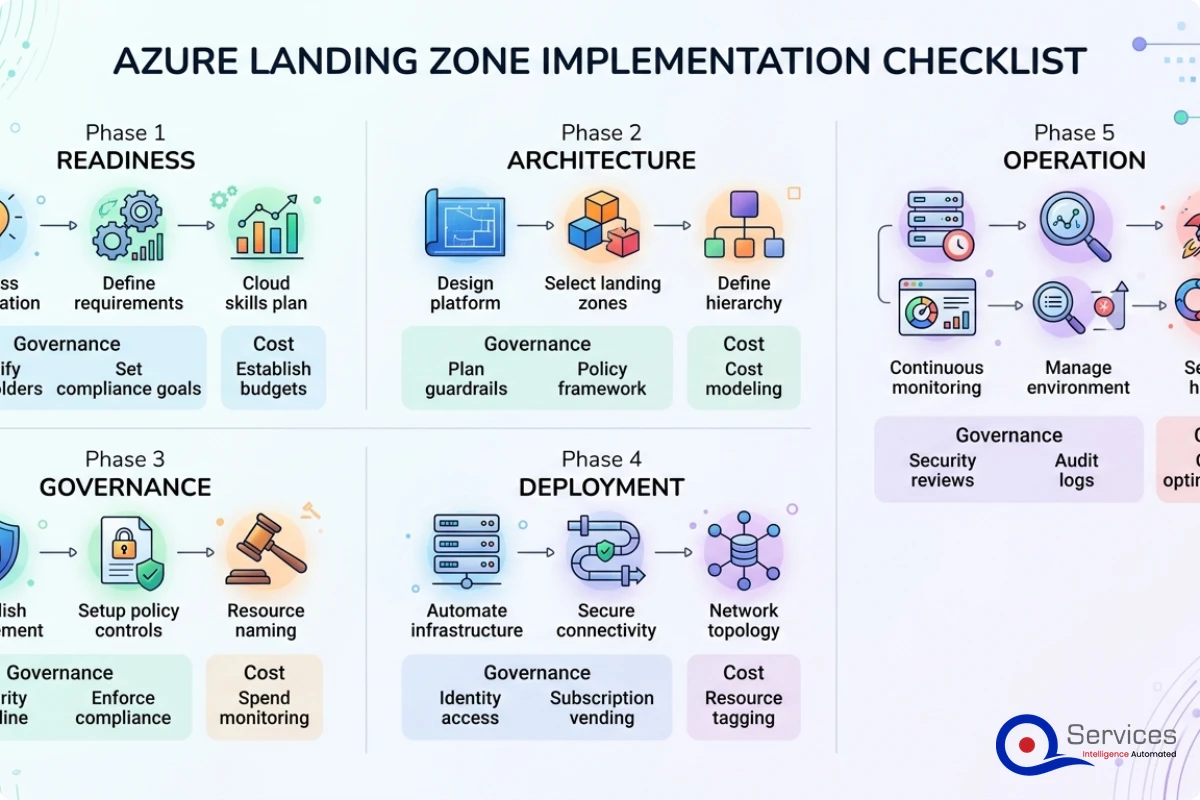
The five phases of azure landing zone implementation are: Assess, Plan, Migrate, Govern, and Optimize. Each phase has distinct outputs and decision gates. Skipping or compressing any phase creates problems in the one that follows.
Phase 1: Azure Infrastructure Assessment and Discovery
Discovery maps every workload, its dependencies, its data flows, and its owner. Tools like Azure Migrate and third-party assessment platforms scan your on-premise environment and generate dependency maps. This phase ends with a prioritized application portfolio: which workloads move first, which move later, and which don't move at all.
In our client engagements, azure cloud migration services at this phase typically cost $15,000-$40,000 for a mid-size company, depending on environment size and complexity. That's the assessment phase only. For a realistic view of total migration investment, see our guide on how much Azure cloud migration actually costs.
Key Insight In our client engagements, azure cloud migration services at this phase typically cost $15,000-$40,000 for a mid-size company, depending on environment size and complexity.
Phases 2-3: Design and Build Your Landing Zone Foundation
The design phase translates assessment findings into architecture decisions: subscription model, network design, identity structure, and security baseline. The build phase deploys the landing zone using infrastructure-as-code (Bicep or Terraform), making every configuration reproducible and auditable.
This is where an azure migration partner adds significant value. Building these components manually through the Azure portal creates configuration drift and makes disaster recovery testing unreliable. A good partner delivers the landing zone as a code repository that your team owns and can extend independently.
Phases 4-5: Migrate Workloads and Optimize
Once the foundation is in place, workloads move in waves. The first wave is typically lower-risk workloads that validate your networking, monitoring, and security baselines. Azure Site Recovery handles server replication; Azure Database Migration Service handles database migrations.
The optimize phase runs concurrently with migration and continues 60-90 days after go-live. It covers right-sizing VMs, implementing reserved instances, and reviewing storage tier assignments. Most companies overspend by 25-35% in their first three months because they over-provision out of caution. Azure cost optimization consulting recovers much of that spend once workload patterns stabilize.
Key Insight Most companies overspend by 25-35% in their first three months because they over-provision out of caution.
How Azure Consulting Services Build Your Cloud Foundation Right
Azure consulting services cover the full spectrum of landing zone work: assessment, architecture design, implementation, and post-migration optimization. Most mid-size companies don't have staff who have done this before, and the learning curve is steep enough that getting it wrong costs more than hiring expert help.
What a Microsoft Azure Consulting Company Actually Does
A microsoft azure consulting company doesn't just configure resources. It brings a methodology: a repeatable process for assessing environments, designing landing zones, managing migrations, and handing over a governed foundation your team can maintain. QServices is a Microsoft Certified Solutions Partner specializing in Azure, which means our team has passed technical assessments and maintains active certifications across the platform.
Our guide on how to evaluate a Microsoft Azure consulting partner covers partner selection in detail. The short version: ask about their methodology, not just their technology stack. Any partner can list Azure services. Fewer have a documented process for governance, change management, and knowledge transfer.
Lift and Shift to Azure vs. Azure App Modernization
The two primary migration strategies are lift and shift to azure (rehost workloads with minimal changes) and azure app modernization (re-architect applications to use cloud-native services like Azure App Service, Azure Container Apps, or Azure Functions). Both are valid, and most migrations use both in different proportions.
Lift and shift is faster and lower risk. You reach Azure quickly, then optimize over time. Azure app modernization takes longer but delivers more durable cost and performance improvements. For most mid-size companies, the practical answer is: lift and shift first to reduce on-premise infrastructure costs, then modernize selectively based on business value and team capacity.
How Azure Security Assessment Protects Your Cloud Environment
Security in an azure landing zone implementation is not a layer you add after the fact. It's built into the foundation during design. An azure security assessment evaluates your identity configuration, network exposure, data classification, and compliance posture before and after migration. Getting this right during design prevents the much more expensive work of remediating security gaps in a live environment.
Identity and Access Management in Azure Landing Zones
Azure Active Directory (now Entra ID) is the identity backbone of every landing zone. Properly configured, it enforces multi-factor authentication, conditional access policies, and Privileged Identity Management for just-in-time administrative access. Poorly configured, it's the most common entry point for security breaches.
The key decisions: how you synchronize on-premise Active Directory to Entra ID, how you structure RBAC roles, and how you govern external identities like contractors and partners. These decisions are much easier to get right during landing zone design than to fix after workloads are in production. For healthcare companies, this security baseline maps directly to HIPAA requirements. Our HIPAA-compliant cloud architecture checklist for Azure covers the specific controls that landing zones need to enforce for covered entities.
Hybrid Cloud Azure Setup and Network Security Boundaries
Many mid-size companies don't migrate everything at once. A hybrid cloud azure setup keeps some workloads on-premise while others run in Azure, connected via ExpressRoute or VPN Gateway. This is a valid intermediate state, but it requires careful network security design: you're extending your security perimeter across two environments simultaneously.
The landing zone network design needs to account for hybrid connectivity from day one. Retrofitting ExpressRoute after the fact means redesigning hub VNet configurations and potentially re-migrating workloads. NIST's cloud computing guidance recommends treating cloud migration security as a continuous risk management process rather than a one-time configuration checkpoint.
How to Migrate on Premise to Azure Without Business Disruption
The question most CTOs actually want answered: how do you migrate on premise to azure without taking down critical systems? The answer is phased migration with parallel run periods and clearly defined rollback criteria for each wave.
Choosing the Right Azure Cloud Migration Path
There are four primary cloud migration approaches: Rehost (lift and shift), Re-platform (minor changes to use managed services), Refactor (restructure to cloud-native architecture), and Retire (decommission unused workloads). Proper azure cloud migration services start by classifying every workload into one of these categories, then sequencing migration waves accordingly.
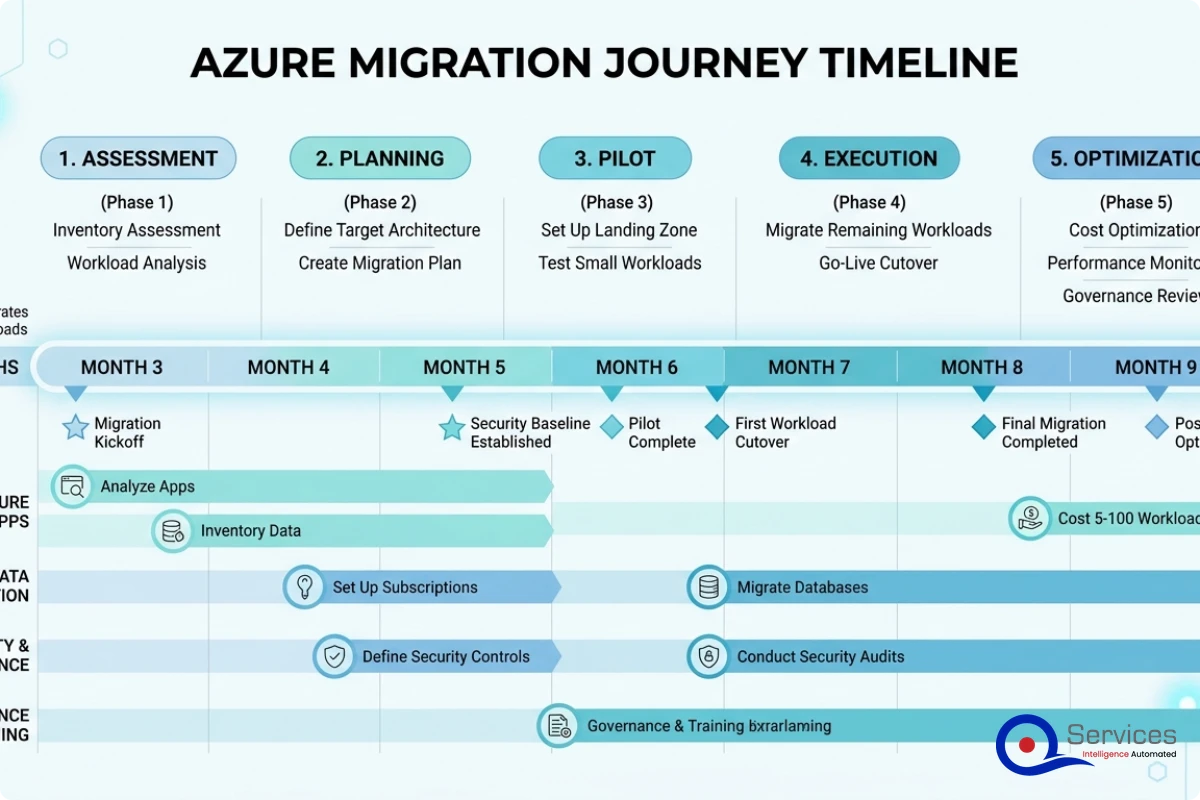
The classification drives your timeline. Rehost workloads can often move in days. Refactor projects can take months per application. Most mid-size company migrations run 3-9 months end-to-end for 50-150 workloads, with the landing zone build taking the first 4-6 weeks. Human-in-the-Loop governance ensures human approval at every deployment stage, which is why QServices builds explicit approval gates into every migration wave. See what is Human-in-the-Loop governance for more detail on why this matters operationally.
Azure DevOps Consulting Services and CI/CD for Migration
Azure devops consulting services matter more than most companies realize when planning migrations. Moving workloads to Azure without updating deployment practices means you've moved the application but kept the operational risk. A CI/CD pipeline in Azure DevOps automates testing, deployment, and rollback, reducing the risk of every future code change.
For teams building Azure DevOps CI/CD pipelines, the landing zone defines the deployment target environment. Get the landing zone wrong and every pipeline fails at the same point. Get it right and you have a predictable, auditable deployment path for every workload.
Azure Cost Optimization: Managing Cloud Spend After Go-Live
Azure cost optimization consulting is, in our experience, the most underinvested part of any migration plan. Companies spend months planning the technical migration and two weeks thinking about cost governance. Then the first Azure bill arrives and the reality gap becomes obvious.
Where Mid-Size Companies Overspend on Azure
The most common overspend patterns:
Over-provisioned VMs: Servers migrated at their original on-premise spec without right-sizing to actual cloud workload patterns
Unattached disks: Storage left running after test VMs were deleted
Development environments running 24/7: Non-production resources that should shut down outside business hours
Wrong storage tier: Infrequently accessed data stored in hot tier instead of cool or archive
No reserved instances: Paying on-demand rates for stable workloads that qualify for 40-70% discounts
Most companies overspend by 25-35% in their first three months on Azure. Getting ahead of this requires budget alerts, tagging governance, and monthly cost reviews built into the landing zone from day one.
Azure Managed Services Provider and Ongoing Cost Governance
An azure managed services provider takes over day-to-day cloud operations after the migration: proactive monitoring, security patching, cost optimization reviews, incident response, and capacity planning. For mid-size companies without a dedicated cloud operations team, this is often more cost-effective than building in-house capability.
The right azure managed services provider doesn't just keep the lights on. They review cost reports monthly, recommend rightsizing changes, monitor for security events, and manage your Azure support relationship. For specific cost reduction strategies, our guide on 7 proven ways to cut Azure costs covers the levers that work for mid-size deployments.
Key Takeaways
An Azure landing zone is a pre-configured, governed environment in Microsoft Azure that gives your organization a consistent foundation for deploying workloads.
Mid-size companies face a specific challenge: they're too large to be informal about cloud governance, but too resource-constrained to build the same infrastructure a Fortune 500 company would.
The five phases of azure landing zone implementation are: Assess, Plan, Migrate, Govern, and Optimize.
Azure consulting services cover the full spectrum of landing zone work: assessment, architecture design, implementation, and post-migration optimization.
Security in an azure landing zone implementation is not a layer you add after the fact.
Conclusion
Azure landing zone implementation is not a technical formality. It's the difference between a cloud environment your team controls and one that controls your team. Mid-size companies benefit most from getting this right the first time: the governance structures, security baselines, and cost controls built into a well-designed landing zone pay dividends for years.
Don't start migrating workloads until your landing zone is built. Every company that has skipped this step has paid to rebuild later, usually 12-18 months in when technical debt becomes impossible to ignore. Start with an azure infrastructure assessment, engage a qualified azure migration partner, and treat the landing zone as your cloud foundation rather than a prerequisite you can defer.
QServices provides azure consulting services as a Microsoft Certified Solutions Partner, with 500+ completed Microsoft platform projects since 2014. If you're planning an azure landing zone implementation and want a structured assessment before committing to a design, contact our team for a complimentary 30-minute architecture review.
Co-Founder and CTO, QServices IT Solutions Pvt Ltd
Rohit Dabra is the Co-Founder and Chief Technology Officer at QServices, a software development company focused on building practical digital solutions for businesses. At QServices, Rohit works closely with startups and growing businesses to design and develop web platforms, mobile applications, and scalable cloud systems. He is particularly interested in automation and artificial intelligence, building systems that automate routine tasks for teams and organizations.
An Azure landing zone is a pre-configured, governed environment in Microsoft Azure that establishes your subscription structure, network topology, identity architecture, security baselines, and cost management policies before any workloads are migrated. It is the cloud equivalent of building codes: every team follows the same governance rules, and new workloads slot in without creating compliance or cost gaps.
Azure cloud migration for mid-size companies typically ranges from $50,000 to $500,000+ depending on workload count, application complexity, and migration approach. The assessment phase alone runs $15,000-$40,000 for environments with 50-200 workloads. Reserved instances and right-sizing can reduce ongoing Azure spend by 30-50% after go-live. Lift-and-shift migrations cost less upfront; application modernization projects cost more but deliver better long-term economics.
Most mid-size company migrations take 3-9 months for 50-150 workloads. The landing zone build takes the first 4-6 weeks. Rehost migrations can complete in days per workload; refactor projects can take months per application. Timeline depends primarily on workload complexity and how many applications require re-architecture versus simple rehosting.
The best approach is phased migration with a landing zone built before any workload moves. Start with an infrastructure assessment, build the landing zone using infrastructure-as-code (Bicep or Terraform), then migrate workloads in waves starting with lower-risk applications. Each wave should include a parallel run period and defined rollback criteria. Use Azure Migrate for discovery, Azure Site Recovery for server replication, and Azure Database Migration Service for databases.
An Azure managed services provider handles day-to-day cloud operations after your migration: proactive monitoring, security patching, cost optimization reviews, incident response, and capacity planning. They review your cost reports monthly, recommend rightsizing changes, monitor for security events, and manage your Azure support relationship. For mid-size companies without a dedicated cloud operations team, this is often more cost-effective than hiring in-house.
For companies already using Microsoft products like Microsoft 365, Dynamics 365, or SQL Server, Azure is typically more cost-effective. Azure Hybrid Benefit lets you bring existing SQL Server and Windows Server licenses to Azure at significantly reduced rates, cutting VM costs by up to 49% for Microsoft-licensed workloads. The comparison depends heavily on your existing software stack and whether your workloads qualify for Microsoft licensing benefits.
Look for a Microsoft Certified Solutions Partner designation, which requires passing technical assessments and maintaining active certifications. Evaluate their methodology for assessments, landing zone design, and knowledge transfer. Ask for references from companies of similar size in your industry. Prioritize partners with documented governance processes and a track record of successful migrations over those who primarily list technology capabilities.
Azure OpenAI security for production apps: identity, private networking, content filters, prompt injection defenses and monitoring to set before go-live.
Business intelligence consulting services should give a mid-market company a governed way to make decisions. Attractive dashboards are only the visible part. The useful outcome is a system in which source data, metric definitions, access, releases, ownership, and support still work after the consultants leave.
In a Microsoft Solutions Partner vs Microsoft Partner comparison, the difference is validation. A company can participate in the Microsoft AI Cloud Partner Program without holding a customer-facing Solutions Partner designation. A designated Solutions Partner has met Microsoft’s current threshold in a specific solution pathway: at least 70 out of 100 partner capability points, with more than zero points in every required metric, based on performance, skilling, and customer success data recorded in Partner Center.
Azure OpenAI security for production apps: identity, private networking, content filters, prompt injection defenses and monitoring to set before go-live.
Business intelligence consulting services should give a mid-market company a governed way to make decisions. Attractive dashboards are only the visible part. The useful outcome is a system in which source data, metric definitions, access, releases, ownership, and support still work after the consultants leave.
In a Microsoft Solutions Partner vs Microsoft Partner comparison, the difference is validation. A company can participate in the Microsoft AI Cloud Partner Program without holding a customer-facing Solutions Partner designation. A designated Solutions Partner has met Microsoft’s current threshold in a specific solution pathway: at least 70 out of 100 partner capability points, with more than zero points in every required metric, based on performance, skilling, and customer success data recorded in Partner Center.
QServices Inc. undertakes every project with a high degree of professionalism. Their communication style is unmatched and they are always available to resolve issues or just discuss the project.
Turn the Microsoft Licenses
You Already Own Into an AI Workplace
Join our live webinar on Sept 24 and see five ways to automate meetings, approvals, and