Power Automate vs Logic Apps: 7 key differences for 2026
Power Automate vs Logic Apps is one of the most common architectural decisions Microsoft shops face in 2026, and the
Architecture map, prioritized backlog, 15/20/45 plan, and risk register — ready for your board.
One workflow shipped end-to-end with audit trail, monitoring, and full handover to your team.
Stabilize a stalled project, identify root causes, reset delivery, and build a credible launch path.
Monitoring baseline, incident cadence targets, and ongoing reliability improvements for your integrations.
Answer 3 quick questions and we'll recommend the right starting point for your project.
Choose your path →Turn scattered data into dashboards your team actually uses. Weekly reporting, KPI tracking, data governance.
Cloud-native apps, APIs, and infrastructure on Azure. Built for scale, maintained for reliability.
Automate manual processes and build internal tools without the overhead of custom code. Power Apps, Power Automate, Power BI.
Sales pipelines, customer data, and service workflows in one place. Configured for how your team actually works.
Custom .NET/Azure applications built for workflows that off-the-shelf tools can't handle. Your logic, your rules.
Every engagement starts with a clear plan. In 10 days you get:
Patient data systems, compliance reporting, and workflow automation for regulated environments.
Real-time tracking, route optimization, and inventory visibility across your distribution network.
Scale your product infrastructure, integrate third-party tools, and ship features faster with reliable ops.
Secure transaction processing, regulatory reporting, and customer-facing portals for financial services.
Get a clear plan in 10 days. No guesswork, no long proposals.
See case studies →Download our free checklist covering the 10 steps to a successful delivery blueprint.
Download free →15-minute call with a solutions architect. No sales pitch — just clarity on your project.
Book a call →Home » Power Automate vs Logic Apps: 7 key differences for 2026
Power Automate vs Logic Apps is one of the most common architectural decisions Microsoft shops face in 2026, and the stakes are higher than they look. Both tools automate workflows inside the Microsoft stack, both connect to hundreds of services, and both claim to solve the same problem. Pick the wrong one and you're asking a developer to maintain a tool built for business users, or a finance team to debug ARM templates they were never meant to touch. This guide covers 7 concrete differences between these Microsoft workflow automation tools, walks through pricing in real numbers, and gives you a practical framework for choosing the right enterprise automation platform.
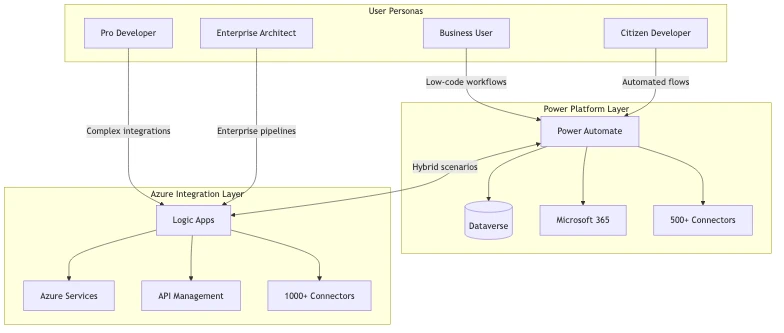
Power Automate is a low-code workflow automation tool inside Microsoft's Power Platform. It targets business users, citizen developers, and Microsoft 365 teams who need to automate repetitive tasks without writing code. Flows are built through a visual designer and run in Microsoft's managed cloud, no infrastructure, no ARM templates, no DevOps pipeline required.
Azure Logic Apps is an Azure-native integration service built for developers and IT teams. It shares the same underlying runtime as Power Automate, but the deployment model, pricing, governance controls, and operational tooling are fundamentally different. Logic Apps workflows deploy as Azure resources, integrate with Azure DevOps and Bicep/Terraform, and connect to enterprise monitoring tools like Azure Monitor and Application Insights.
The practical split: Power Automate handles day-to-day task automation inside Microsoft 365. Logic Apps handles system integrations, API orchestration, and high-volume event processing on Azure. This Power Automate Azure comparison maps to two distinct audiences, and conflating them leads to expensive rework.
Power Automate is licensed through Microsoft 365 plans. Most M365 business plans include basic access, so employees can start building flows immediately with no additional spend. It connects natively to SharePoint, Teams, Dynamics 365, and Dataverse. If you are managing Power Platform governance in your organization, Power Automate is the automation layer most of your users will touch directly.
Logic Apps sits inside Azure's integration services family alongside Azure Service Bus, Azure API Management, and Azure Event Grid. It runs mission-critical workflows with SLA guarantees, consumption-based or dedicated hosting, and enterprise-grade observability. Logic Apps connects to Azure services with managed identities, private endpoints, and VNET integration. Those capabilities are not available in Power Automate's cloud flow model.
Low-code vs pro-code automation covers more than coding ability. The real question is who owns the workflow, who maintains it, and who debugs it when it fails. Power Automate targets business analysts and operations managers. Logic Apps targets developers who need code-level control: custom connectors, inline expressions, ARM/Bicep deployment, and structured observability.
A finance team automating invoice approvals belongs in Power Automate. An IT team building a customer onboarding pipeline that calls internal APIs, writes to Azure SQL, and queues messages in Azure Service Bus belongs in Logic Apps.
Power Automate per-user plans run approximately $15/user/month (Premium), and per-flow plans cost around $500/flow/month. Azure Logic Apps pricing runs on two models: Consumption (approximately $0.000025 per action) and Standard (approximately $0.197/hour for S1). Full details are on the official Microsoft Azure Logic Apps pricing page.
Power Automate licensing costs for mid-market companies scale quickly. Ten per-flow licenses at $500/month equals $5,000/month. That same budget runs dozens of Logic Apps Standard workflows with room to spare.
Both tools offer 1,000+ connectors. But Azure Logic Apps connectors vs Power Automate connectors diverge at the enterprise level. Power Automate has deep Microsoft 365-optimized connectors for Teams, Planner, and Forms. Logic Apps has enterprise connectors for SAP, AS2, X12, IBM MQ, and EDI protocols that Power Automate does not support. For mainframe or legacy B2B protocol connectivity, Logic Apps is the only option in the Microsoft stack.
Power Automate flows deploy through a web portal or solution packages. There is no native Git integration, no CI/CD pipeline, and no infrastructure-as-code support. Fast to start, difficult to govern at scale.
Logic Apps deploys as ARM templates or Bicep and integrates natively with Azure DevOps pipelines. You get branching, pull request reviews, automated testing, and rollback. For IT teams that take delivery governance seriously, this difference matters more than any feature comparison.
Power Automate runs exclusively in Microsoft's managed cloud with no dedicated compute and no private networking for cloud flows. Power Automate desktop vs cloud flow differences explained: desktop flows automate Windows applications on a local machine or via an on-premises gateway, while cloud flows run in Microsoft's shared infrastructure.
Logic Apps offers three hosting models: Consumption (shared multi-tenant), Standard (single-tenant, VNET-injectable), and the deprecated ISE (replaced by Standard). Standard supports private endpoints and VNET integration, which are required in most regulated production environments.
Power Automate governance relies on DLP policies (covered in our DLP Policies in Power Platform guide), the Power Platform Admin Center, and tenant-level connector settings. It works for most organizations but requires deliberate configuration to prevent unsanctioned automation.
Logic Apps governance uses Azure RBAC, Azure Policy, private endpoints, and Managed Identity authentication. IT teams apply the same security posture to Logic Apps as to any other Azure resource. For regulated industries (healthcare, banking, financial services), Logic Apps is significantly easier to audit for HIPAA and PCI-DSS compliance.
Power Automate has throttling limits that bite at enterprise scale. Most connectors poll on a minimum interval (5 minutes on standard, 1 minute on premium), and API call limits per connection apply. For workflows processing thousands of records per hour, these limits create real operational bottlenecks.
Azure Logic Apps workflow automation scales without shared-resource throttling. Azure Logic Apps consumption vs standard plan for ISVs: Consumption fits bursty workloads well; Standard handles sustained high-throughput with dedicated compute, predictable cost, and VNET isolation. For ISVs building multi-tenant SaaS products, Logic Apps Standard is the production-grade choice.
Power Automate is cheaper for small teams with simple workflows. Logic Apps is cheaper for high-volume, complex integrations. Here is a practical breakdown:
| Scenario | Recommended Tool | Estimated Monthly Cost |
|---|---|---|
| 50 M365-licensed users, basic flows | Power Automate (M365 included) | $0 additional |
| 200 users needing premium connectors | Power Automate Premium | ~$3,000/month |
| 1 high-volume API integration, 500K actions | Logic Apps Consumption | ~$12.50/month |
| Enterprise IT pipeline, VNET required | Logic Apps Standard S1 | ~$142/month |
| 10 complex enterprise integrations | Logic Apps Standard | Less than 10 per-flow licenses |
One thing worth knowing: Power Automate Premium is included in Dynamics 365 licenses, so organizations already on Dynamics 365 may have premium access without additional cost.
Microsoft automation tools market share continues to grow as Power Platform competes directly with Zapier, Make, and UiPath. Microsoft reports the Power Platform is used by millions of organizations globally. Power Platform automation ROI benchmarks for mid-market companies consistently show 15 to 20 percent productivity gains on properly implemented processes, though that number varies significantly by implementation quality. Azure Logic Apps enterprise adoption rate has also risen steadily as more ISVs standardize on Azure integration services for their back-end pipelines.
Eager to discuss about your project?
Share your project idea with us. Together, we’ll transform your vision into an exceptional digital product!
Book an Appointment nowNeither tool is objectively better. The right question is which fits your team, your IT maturity, and your use case.
If your automation lives inside Microsoft 365 (Teams, SharePoint, Outlook, Planner, Forms, Dataverse), start with Power Automate. It has the deepest M365 connector coverage, the lowest barrier for business users, and licensing already in most M365 agreements. Approval workflows, document routing, scheduled reports, and notifications are Power Automate's natural territory.
We built a full leave management app in Power Apps with Power Automate handling all the approval logic; the entire project took 3 days from kickoff to production. That is the speed advantage Power Platform automation tools deliver when the use case fits.
Choose Logic Apps when any of these apply:
Rule-based vs event-driven automation in Microsoft stack often maps to this division naturally: rule-based approvals belong in Power Automate; event-driven, API-triggered back-end integrations belong in Logic Apps. In most enterprise architectures, both tools run simultaneously.
Yes, and this hybrid approach is actually the recommended architecture for many enterprise scenarios. You can trigger Azure Logic Apps from Power Automate using an HTTP trigger on the Logic Apps side, passing data from a user-initiated flow into a back-end pipeline.
A practical example: a sales team uses Power Automate to capture a deal-closed event in Dynamics 365. That flow calls a Logic Apps HTTP endpoint, which then orchestrates a multi-step onboarding sequence: provisioning accounts in Azure AD, calling the billing API, creating project records, and sending operational alerts. The sales team sees a simple Power Automate flow. IT manages the back-end integration in Logic Apps with full RBAC and CI/CD controls.
This pattern also solves the governance problem. IT controls everything inside Logic Apps while business users work within a Power Automate interface scoped to what they actually need. For cloud workflow orchestration at enterprise scale, this division of responsibility is more practical than forcing all automation into one tool.
Eager to discuss about your project?
Share your project idea with us. Together, we’ll transform your vision into an exceptional digital product!
Book an Appointment nowPower Automate or Logic Apps for API integration is a question that comes up most often when teams hit Power Automate's real limits.
Debugging is limited. When a Power Automate flow fails, error logs give basic run history with minimal context. Logic Apps integrates with Application Insights and gives structured JSON logs, correlation IDs, and the ability to resubmit failed runs from any point in the workflow. For production integrations, this difference is substantial.
Version control is manual. Power Automate flows live in environments, not Git repositories. You can export solution packages, but it is a manual process most teams skip. Logic Apps workflows are ARM resources that go through Git, pull requests, and standard release pipelines.
Custom connectors have constraints. Power Automate custom connectors support OpenAPI 2.0 only. Logic Apps supports OpenAPI 2.0 and 3.0, and can call any HTTP endpoint directly with full header, body, and authentication control without a connector wrapper.
AI-generated flows still need review gates. With Microsoft Copilot now generating Power Automate flows from natural language, the governance requirement has not decreased. Power Automate enterprise automation at scale, particularly with AI-generated flows accessing sensitive data, requires human review at design and deployment stages. This is especially true in regulated environments where automation errors carry compliance consequences.
How to migrate Power Automate flows to Azure Logic Apps is a practical concern for teams that outgrew their original setup. There is no one-click export. Microsoft provides migration guidance in the official Azure Logic Apps documentation, but the practical approach is a rebuild, not an automated conversion.
Here is the process that works:
The rebuild step matters more than most teams expect. Power Automate flows often lack proper exception handling because the visual designer makes it easy to skip those details. The migration is an opportunity to fix that. In our KYC automation project, rebuilding rule-based processing workflows with proper exception handling cut processing time from 5 days to 4 hours. The same quality improvement happens when you migrate with intention rather than rushing a conversion.
Power Automate vs Logic Apps is not a competition with one clear winner. Microsoft designed these tools for different teams, and both are maturing quickly in 2026. Power Automate is the right enterprise automation platform for business users working inside Microsoft 365: fast to deploy, low maintenance, and likely already licensed. Azure Logic Apps is the right cloud workflow orchestration tool for IT and development teams building production integrations on Azure, with the DevOps tooling, security controls, and observability that high-stakes workflows require.
The decision is straightforward once you know who owns the workflow. Business user builds and maintains it: start with Power Automate. IT team owns the integration: start with Logic Apps. For complex organizations, both Microsoft workflow automation tools run side by side, each doing what it was built for. If you want an architecture review before committing to either tool, QServices works with mid-market and enterprise teams across healthcare, logistics, and financial services to design Microsoft automation systems that actually scale.

Written by Rohit Dabra
Co-Founder and CTO, QServices IT Solutions Pvt Ltd
Rohit Dabra is the Co-Founder and Chief Technology Officer at QServices, a software development company focused on building practical digital solutions for businesses. At QServices, Rohit works closely with startups and growing businesses to design and develop web platforms, mobile applications, and scalable cloud systems. He is particularly interested in automation and artificial intelligence, building systems that automate routine tasks for teams and organizations.
Talk to Our ExpertsPower Automate is a low-code automation tool in Microsoft’s Power Platform, designed for business users building workflows inside Microsoft 365. Azure Logic Apps is an Azure-native integration service for developers and IT teams, supporting ARM/Bicep deployment, VNET integration, and enterprise connectors like SAP and AS2. They share the same underlying runtime but target completely different audiences and use cases.
It depends on volume. Power Automate is cheaper for small teams since most Microsoft 365 plans include basic access. For high-volume or complex integrations, Logic Apps Consumption pricing (approximately $0.000025 per action) is often far cheaper. A Logic Apps Standard S1 plan at roughly $142/month can replace multiple Power Automate per-flow licenses at $500/month each. The crossover point varies, but enterprises running 10 or more complex integrations almost always pay less with Logic Apps.
For most enterprise back-end integrations, no. Power Automate lacks VNET integration, native CI/CD deployment, enterprise protocol connectors (SAP, AS2, X12), and the Application Insights observability that production workloads need. It is the right tool for business user automation within Microsoft 365, but not a replacement for IT-managed Azure integrations at scale.
Choose Logic Apps when the workflow is system-to-system rather than user-initiated, when you need VNET isolation or private endpoint connectivity, when enterprise protocols like SAP or EDI are involved, when IT needs CI/CD control over deployment, or when compliance requirements such as HIPAA or PCI-DSS require full Azure audit trails. If throughput consistently exceeds Power Automate connector polling limits, Logic Apps is also the better fit.
Yes. Power Automate has standalone licensing options: a per-user plan at approximately $15/user/month and a per-flow plan at approximately $500/flow/month. A Microsoft 365 license is not required, though M365 plans include basic Power Automate access as part of the bundle. For premium connectors and higher-frequency triggers, a standalone Power Automate Premium license is needed regardless of M365 status.
Yes. You can call a Logic Apps workflow from Power Automate using the Logic Apps HTTP trigger. The Power Automate flow sends data to the Logic Apps HTTP endpoint, and Logic Apps processes it from there. This hybrid pattern is common in enterprise architectures where business users manage a front-end Power Automate flow while IT governs the back-end integration logic in Logic Apps with full RBAC and CI/CD controls.
Power Automate’s main limitations for complex integrations include connector polling intervals with minimum thresholds (5 minutes on standard plans), no native Git or CI/CD integration, limited debugging and observability compared to Application Insights, custom connector support restricted to OpenAPI 2.0, and no VNET or private endpoint support for cloud flows. For back-end system integrations at scale, Azure Logic Apps is the more capable and auditable tool.

Power Automate vs Logic Apps is one of the most common architectural decisions Microsoft shops face in 2026, and the
Dynamics 365 implementation cost is one of the first questions every mid-size company asks when evaluating Microsoft's ERP and CRM
Software delivery governance is the reason we still have clients after five years. Not the AI tools we use, not
Custom power apps development, in most organizations, is treated like a six-month project. Requirements workshops, vendor selection, development sprints, UAT

This kyc automation case study documents how a regional bank cut customer onboarding from five business days to four hours

Power platform dlp policies are the first line of defense between your citizen developers and a compliance incident. When Microsoft

Eager to discuss about your project?
Share your project idea with us. Together, we’ll transform your vision into an exceptional digital product!
Book an Appointment now