If your business handles card payments, you already know the pressure that comes with it. Payment processing automation on Azure with PCI DSS compliance is no longer a topic reserved for large banks with dedicated security teams. Startups and SMBs are expected to meet the same standards, often with far fewer resources. The good news: Microsoft Azure provides a set of managed services that can simplify how you build, automate, and maintain a compliant payment system. This guide breaks down which Azure services to use, how to structure your payment workflows, and how to reduce your compliance scope without hiring a full-time compliance officer.
Why PCI DSS Compliance Still Catches Small Businesses Off Guard
PCI DSS (Payment Card Industry Data Security Standard) is the global framework governing how businesses store, process, and transmit cardholder data. Non-compliance can result in fines ranging from $5,000 to $100,000 per month, plus potential liability for fraudulent transactions. Despite these stakes, many SMBs treat PCI DSS as an afterthought.
The typical scenario goes like this: a startup builds a payment feature quickly using a third-party gateway and assumes compliance comes bundled in. It does not. Your infrastructure, your code, and your internal processes all fall under scope. That scope expands fast when payment data touches your servers.
Azure gives SMBs a clear path forward, but only if you understand which services to use and how to configure them correctly.
Is Microsoft Azure PCI DSS Certified for Payment Processing Workloads?
Yes, Microsoft Azure holds PCI DSS Level 1 certification, the highest level available. This certification covers Azure's infrastructure: its data centers, networking, and core platform services. Microsoft publishes its Attestation of Compliance (AoC) and is assessed annually by a Qualified Security Assessor (QSA).
When you build on Azure, the underlying infrastructure layer is already certified. You inherit that compliance posture rather than starting from scratch.
There is an important distinction here, though. Azure being PCI DSS certified does not make your application automatically compliant. You are responsible for how you configure and use those services. If your application logs raw card numbers, that is your problem, not Microsoft's. The shared responsibility model is real, and ignoring it is one of the most common mistakes fintech startups make.
A good first step is reviewing Microsoft's Azure Blueprint for PCI DSS, which maps Azure controls directly to specific PCI DSS requirements. For teams earlier in their cloud journey, our Azure Migration Services for Businesses: A Beginners Guide explains how to move workloads to Azure while maintaining security and control from the start.
Key Azure Services for Payment Processing Automation Azure PCI DSS
Building a compliant payment system on Azure requires layering several components, each addressing specific PCI DSS requirements. There is no single service that does it all.
Azure API Management
Azure API Management (APIM) is your gateway between your application and external payment processors like Stripe, Braintree, or Adyen. It handles request routing, rate limiting, authentication, and logging without exposing internal services to the public internet.
For PCI DSS, APIM lets you enforce mutual TLS on payment API calls, apply IP restrictions, and centralize audit logging. Every payment request passes through a single, controlled entry point, which makes your environment far easier to audit and significantly narrows the attack surface.
Azure Key Vault
Azure Key Vault is where you store all payment-related secrets: API keys, certificates, encryption keys, and connection strings. It directly addresses PCI DSS Requirement 3 (protect stored cardholder data) and Requirement 8 (strong access control).
Key Vault uses hardware security modules (HSMs) to protect cryptographic keys. It integrates with Azure Active Directory so access is governed by identity, not hardcoded credentials buried in your codebase.
Azure Logic Apps for Workflow Automation
Azure Logic Apps is the workflow engine that connects your payment flows end to end. A typical payment automation sequence might look like this:
Customer initiates payment on your frontend
Logic Apps receives a trigger via HTTP connector or Service Bus message
APIM routes the tokenized payment request to the payment gateway
Logic Apps handles the response, updates your database, and triggers downstream events such as receipt emails, invoice generation, and ledger updates
All steps are logged to Azure Monitor
Keeping human hands out of the transaction flow directly reduces your PCI DSS audit scope.
Azure Service Bus
Service Bus provides reliable, asynchronous messaging between your payment components. If the payment gateway is temporarily unavailable, Service Bus queues the message and retries automatically. This prevents data loss and creates an audit trail of every payment attempt, which supports PCI DSS logging requirements.
Azure Monitor and Microsoft Sentinel
PCI DSS Requirement 10 mandates tracking and monitoring all access to network resources and cardholder data. Azure Monitor collects logs from every service in your payment stack. Microsoft Sentinel adds SIEM capabilities, correlating events and alerting on suspicious patterns like unusual transaction volumes or API key misuse.
How to Tokenize Payment Data in Azure to Minimize PCI DSS Scope
Tokenization is one of the most effective strategies for shrinking your compliance scope. Your system never stores raw card data. The payment processor returns a token (a random string that maps to the real card number in the processor's vault), and your application stores and works with that token only.
Here is how to implement this on Azure:
Use a PCI DSS compliant payment gateway (Stripe, Adyen, or Braintree) that captures raw card data directly in the browser via their JavaScript SDKs
Never route raw card data through your backend. The tokenized value is what reaches your API Management layer
Store tokens in Azure SQL or Cosmos DB, not card numbers, and apply encryption at rest using customer-managed keys from Azure Key Vault
Use Azure Private Endpoints to ensure database traffic never crosses the public internet
When tokenization is implemented correctly, your cardholder data environment (CDE) may shrink to just the APIs calling the payment gateway. This can move you from SAQ D (329 requirements) to SAQ A or SAQ A-EP (under 40 requirements), which is a significant reduction in compliance burden.
SAQ A vs SAQ D: Which One Applies to Your Azure Payment Setup?
The Self-Assessment Questionnaire (SAQ) determines how much compliance work your business must complete. Getting this right matters because the difference between SAQ types is substantial.
SAQ Type
Who It Applies To
Approximate Requirements
SAQ A
Fully outsourced card acceptance (iframes, redirect to hosted payment page)
~22
SAQ A-EP
E-commerce merchants with custom payment pages loading gateway scripts
~191
SAQ D
Merchants storing, processing, or transmitting cardholder data on their own systems
~329
For most Azure-hosted fintech applications, the goal is SAQ A or SAQ A-EP. SAQ A applies when your payment pages are fully hosted by a compliant third party and your servers never touch card data. SAQ A-EP applies when you use JavaScript SDKs from the gateway but your page originates from your own domain.
SAQ D applies if your backend ever processes raw cardholder data. Azure’s services do not automatically move you out of SAQ D territory. Your architecture must do that.
Understanding this distinction early saves months of compliance work. Many startups discover they are operating in SAQ D territory only when preparing for their first audit.
Azure Logic Apps for Automated Payment Workflows: A Practical Look
Azure Logic Apps is the orchestration layer that ties payment processing automation on Azure together. It is where most of the workflow logic actually lives, so it deserves a closer look beyond the overview above.
What Logic Apps Does Well
Logic Apps provides over 400 built-in connectors, including connectors for Stripe, PayPal, and Dynamics 365. For a payment workflow, this means you can build a complete order-to-receipt flow without writing custom integration code for every endpoint.
A subscription billing automation in Logic Apps might:
Trigger on a schedule (first of the month)
Pull active subscriptions from your database
Call the payment gateway API for each subscriber
Handle successes by updating subscription status and queuing a receipt email
Handle failures by triggering a retry workflow and notifying the customer
Every run is logged with inputs and outputs, giving you a complete audit trail that satisfies PCI DSS Requirement 10.
What to Watch Out For
Logic Apps run logs can inadvertently capture payment-related data if your connector configurations are not set up carefully. Always enable input/output sanitization on any connector that touches payment flows. This is a recurring finding in PCI DSS audits of Azure-hosted applications and one that is easy to miss during development.
Reducing PCI DSS Compliance Costs on Azure for Fintech Startups
Full PCI DSS compliance for a growing fintech can cost between $15,000 and $200,000 per year when you factor in QSA assessments, penetration testing, security tooling, and staff time. Azure's managed services shift a significant portion of that burden to Microsoft.
Here is where Azure delivers the clearest savings:
Infrastructure security: Azure handles physical security, network segmentation, and platform-level controls, all already covered in their published AoC
Key management: Key Vault removes the need for a dedicated HSM appliance, which can cost $20,000 or more to purchase and maintain
Logging and monitoring: Azure Monitor and Sentinel can replace standalone SIEM tools that often run $30,000 or more annually at enterprise pricing
Vulnerability management: Microsoft Defender for Cloud provides continuous security posture scoring with specific PCI DSS control mapping, reducing the need for separate scanning tools
That said, Azure costs can add up if you are not deliberate about your architecture. For startups managing cloud spend carefully, our guide on How Azure Cloud Empowers SMBs covers how to right-size your Azure deployment and avoid paying for capacity you do not need.
Eager to discuss about your project?
Share your project idea with us. Together, we’ll transform your vision into an exceptional digital product!
The Biggest Risks of Non-Compliant Payment Processing Automation
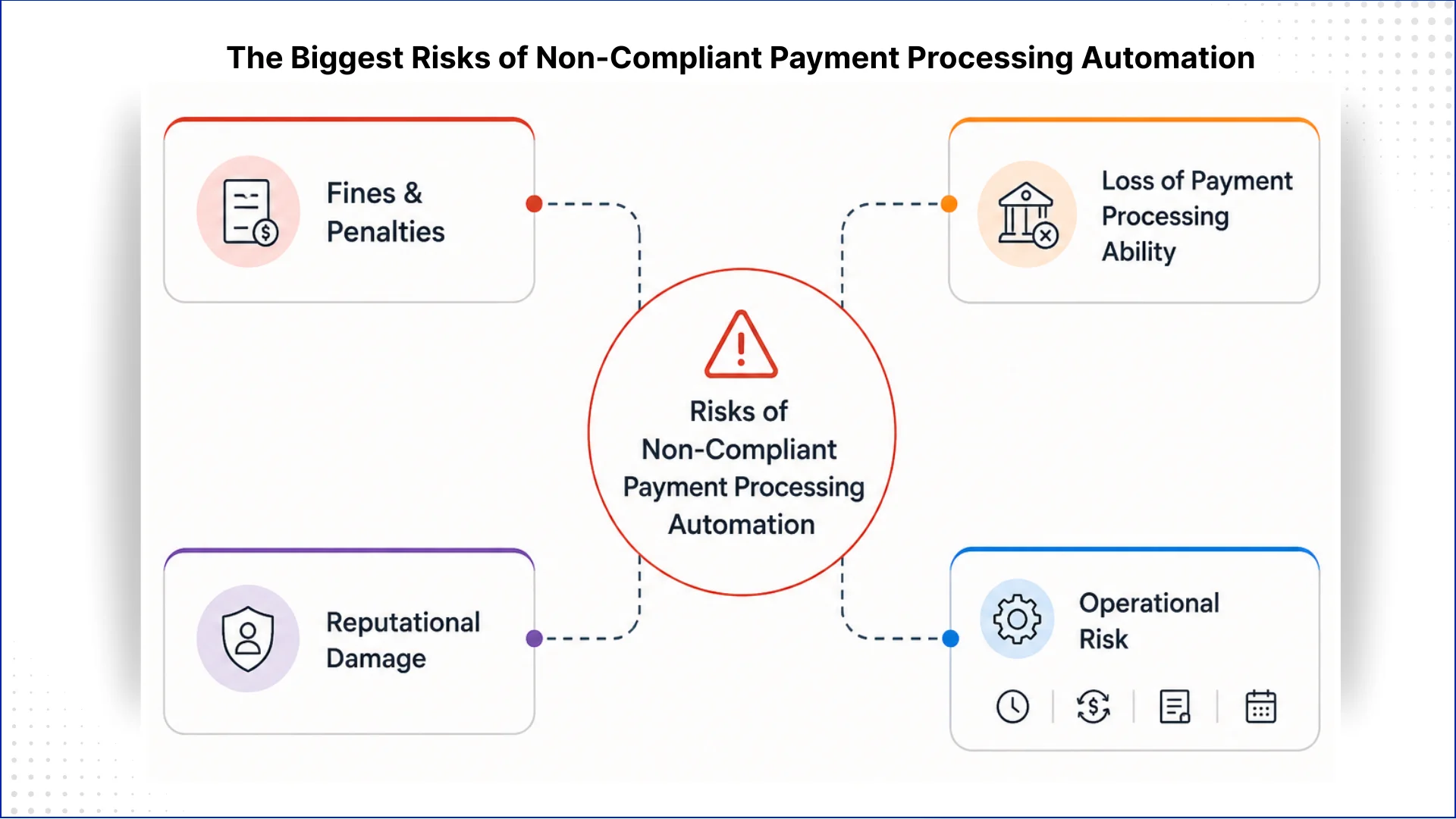
Non-compliance is a business continuity risk, not just a regulatory one.
Fines and penalties are the most visible consequence. Card brands can charge acquiring banks $5,000 to $100,000 per month for non-compliant merchants, and those costs flow down to you. After a breach while non-compliant, per-incident fines can reach $500,000.
Loss of payment processing ability is often the more immediate threat. If your acquiring bank determines you are non-compliant following a breach, they can terminate your ability to accept card payments. For a fintech startup, this is a business-ending scenario, not a recoverable setback.
Reputational damage follows a breach even when fines are manageable. Studies consistently show that a significant majority of consumers stop using services after a payment data breach, and trust in financial services is difficult to rebuild once lost.
Poor payment automation design also creates operational risk in the form of settlement delays, double-charges, failed reconciliations, and missed regulatory reporting windows. These problems compound quickly in high-volume environments and can attract regulatory scrutiny independent of a breach.
Building Your PCI DSS Compliant Payment System on Azure: Where to Start
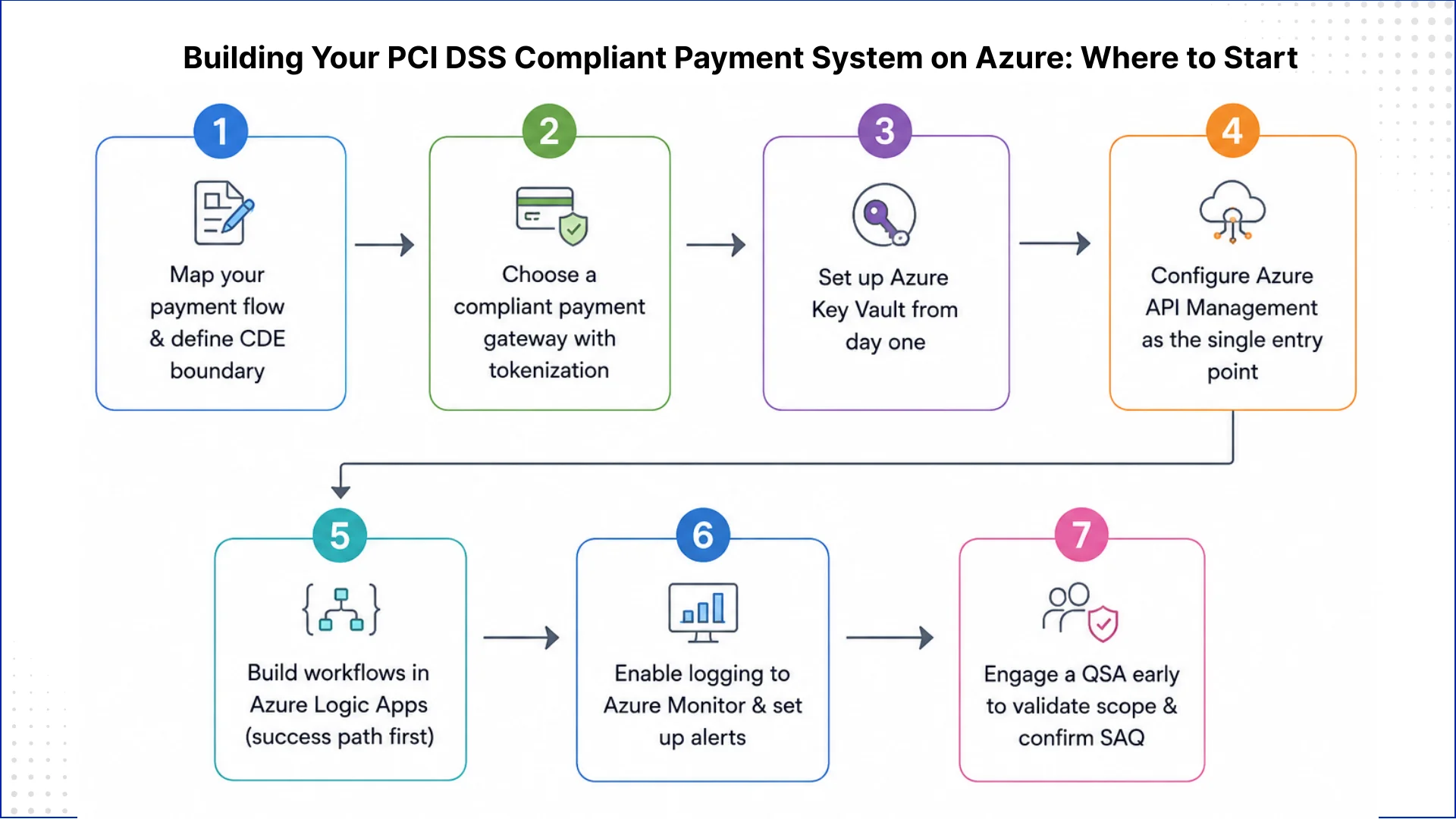
Most teams get stuck deciding where to begin. Here is a practical starting sequence that works for both early-stage startups and SMBs moving existing payment flows to Azure.
Map your payment flow on paper before writing any code. Identify every point where card data or tokens enter, move through, and exit your system. This defines your CDE boundary and your SAQ type.
Choose a compliant payment gateway that supports tokenization and offers Azure connectors or webhooks.
Set up Azure Key Vault from day one. Never hardcode a payment API key in your application code, even in development environments.
Configure Azure API Management as the single entry point for all payment gateway calls.
Build your workflows in Azure Logic Apps, starting with the successful payment path, then adding error handling, retries, and notification logic.
Enable logging to Azure Monitor and configure alerts for failed transactions, unusual volumes, and unauthorized access attempts.
Engage a QSA early, ideally before go-live, to validate your scope definition and confirm your SAQ selection.
Payment processing automation Azure PCI DSS compliance is within reach for startups and SMBs that build their architecture with compliance in mind from day one. Azure's managed services, including Key Vault, API Management, Logic Apps, Service Bus, and Monitor, provide strong building blocks. What determines your actual compliance posture is how you configure and connect these services, and whether your architecture keeps raw card data out of your systems entirely.
Start with your payment flow map, define your CDE boundary, and build outward from there. Tokenize early, log everything, and bring in a QSA before you go live rather than after your first audit. If your team needs support designing or implementing a compliant payment system on Azure, QServices specializes in bespoke Microsoft Azure solutions for fintech and financial services organizations. Reach out to discuss what your specific build requires.
The core services are Azure API Management (for secure gateway integration and access control), Azure Key Vault (for storing secrets and encryption keys), Azure Logic Apps (for workflow orchestration), Azure Service Bus (for reliable asynchronous messaging), and Azure Monitor with Microsoft Sentinel (for audit logging and threat detection). Together, these services address the majority of PCI DSS technical requirements across Requirement 3, 8, 10, and network security controls.
The most practical approach for small businesses is to use a PCI DSS compliant payment gateway (such as Stripe or Adyen) that handles raw card capture in the browser, then build an automation layer on Azure using Logic Apps for workflow orchestration and API Management as the single controlled entry point for all payment calls. This keeps card data out of your systems entirely, reducing your compliance scope to SAQ A or SAQ A-EP levels and significantly lowering both audit complexity and cost.
Yes. Microsoft Azure holds PCI DSS Level 1 certification, the highest level available, covering its infrastructure, data centers, and core platform services. Microsoft publishes an Attestation of Compliance (AoC) and undergoes annual QSA assessments. However, this certification covers the infrastructure layer only. Your application configuration, data handling practices, and internal processes must also meet PCI DSS requirements under the shared responsibility model.
SAQ A applies to merchants who fully outsource card acceptance to a compliant third party and whose servers never touch raw card data (approximately 22 requirements). SAQ D applies to merchants who store, process, or transmit cardholder data on their own systems (329 requirements). SAQ A-EP sits in between, covering e-commerce merchants whose payment pages load gateway JavaScript but originate from their own domain (approximately 191 requirements). Most Azure-hosted fintech applications using tokenization and hosted payment pages can qualify for SAQ A or SAQ A-EP.
Azure Logic Apps orchestrates the end-to-end payment flow, from receiving a payment trigger to calling the payment gateway API, handling the response, updating records in your database, and triggering follow-on actions like receipt emails or ledger updates. It has over 400 built-in connectors including major payment processors, and every workflow run is fully logged with inputs and outputs, which directly supports PCI DSS Requirement 10 audit trail obligations.
Yes. Azure’s managed services reduce compliance costs by covering infrastructure-level security controls that would otherwise require separate tools and dedicated headcount. Azure Key Vault removes the need for dedicated HSM hardware (often $20,000 or more), Azure Monitor and Sentinel can replace standalone SIEM solutions, and Microsoft Defender for Cloud provides continuous PCI DSS posture scoring. Startups building on Azure can meaningfully reduce both the annual cost and operational complexity of their compliance program compared to running equivalent controls on-premises.
Use a compliant payment gateway that captures card data directly in the browser via JavaScript SDKs, so raw card numbers never reach your backend. The gateway returns a token, which your application stores in Azure SQL or Cosmos DB with encryption at rest using customer-managed keys from Azure Key Vault. Combine this with Azure Private Endpoints to keep all database traffic off the public internet. When implemented correctly, this architecture can reduce your compliance scope from SAQ D (329 requirements) to SAQ A (approximately 22 requirements), which is one of the most impactful architectural decisions a fintech startup can make early on.
Eager to discuss about your project?
Share your project idea with us. Together, we’ll transform your vision into an exceptional digital product!
Pint AE explained for UAE finance teams with one sample invoice: see which fields come from your ERP, which go missing, and how to test before go-live.
Days sales outstanding explained for CFOs: the formula, worked examples, named industry benchmarks, and why seasonal sales distort DSO. See what moves it.
Follow one payment through the cash application process, step by step, and see the exact moment it stalls so your AR team can clear unapplied cash faster.
QServices Inc. undertakes every project with a high degree of professionalism. Their communication style is unmatched and they are always available to resolve issues or just discuss the project.
Turn the Microsoft Licenses
You Already Own Into an AI Workplace
Join our live webinar on Sept 24 and see five ways to automate meetings, approvals, and