Azure API Management for fintech startups is one of those infrastructure decisions that sounds boring until you realize it determines whether your payment API survives a security audit or whether your first enterprise client can actually integrate with you. Most Azure tutorials pitch APIM at large banks with dedicated platform teams. This guide is for the other side: a small fintech team, probably 5-15 engineers, trying to build a secure, monetizable API product without hiring three DevOps specialists.
Below are five design patterns that work at startup scale, along with honest notes on pricing, compliance trade-offs, and where the common mistakes happen.
Why Azure API Management Makes Sense for Fintech Startups
The honest case for Azure API Management is not that it is the cheapest option or the easiest to set up. It is that it collapses four separate concerns into one managed service: authentication, rate limiting, analytics, and a developer portal. A startup building payment APIs would otherwise need to stitch those capabilities together from scratch or buy separate SaaS tools for each one.
APIM sits between your clients (mobile apps, partner integrations, embedded finance products) and your backend services. Every inbound request passes through a policy pipeline where you can inspect, transform, throttle, or reject it before it reaches your code. This matters for fintech specifically because payment APIs carry liability. A poorly configured endpoint that leaks transaction data or allows unauthenticated calls is not just a technical problem.
Microsoft's Azure API Management documentation outlines the full policy catalog, but the key point for startups is integration depth. Azure API Management connects directly to Azure Active Directory B2C, which is relevant if you are already building customer-facing apps. If you have walked through a Flutter and Azure B2C customer onboarding flow, you already have the identity layer that APIM can consume for API authorization without duplicating infrastructure.
Pattern 1: Secure Payment API Gateway with OAuth 2.0 and Mutual TLS
The pattern: Route all payment API traffic through Azure API Management with OAuth 2.0 bearer token validation at the gateway layer and mutual TLS for backend connections.
This is the baseline security pattern every fintech startup should have in place before going live. Here is how it works in practice:
Client applications request an access token from Azure AD B2C or your OAuth 2.0 authorization server.
The client sends the bearer token with every API request to APIM.
Azure API Management validates the token using the validate-jwt policy before forwarding the request.
APIM connects to your backend over mutual TLS, where both the gateway and backend authenticate each other with certificates.
The validate-jwt policy is where most teams make their first mistake. The default configuration only verifies the token's signature, not the audience (aud) or issuer (iss) claims. A misconfigured JWT validator will accept tokens issued for a completely different application. Always pin the issuer URL and expected audience explicitly:
For mutual TLS to the backend, configure client certificates in Azure API Management and require certificate-based authentication on your backend app service or container. This protects against scenarios where someone bypasses the APIM gateway entirely and hits your backend directly.
The OAuth 2.0 specification is the definitive reference for token scopes and grant types. For payment APIs, the client credentials flow works well for machine-to-machine calls, while authorization code with PKCE is the right choice for user-facing flows.
Pattern 2: Rate Limiting and Throttling for Payment APIs on Azure
The pattern: Apply layered rate limits using Azure API Management's rate-limit-by-key policy to protect both your backend and your operating costs.
Rate limiting in APIM works at two levels. The first is a global rate limit that protects your backend from traffic spikes. The second is a per-subscription or per-IP limit that prevents any single consumer from monopolizing your API capacity.
A typical setup for a startup payment API:
Global limit: 5,000 calls per minute across all consumers
Per-subscription limit: 200 calls per minute per API key
Burst tolerance: Short 10-second window at 2x the per-subscription rate
The quota-by-key policy adds a monthly call cap on top of the rate limit, which is useful if your pricing model charges clients per transaction volume. You can tie these quotas directly to APIM subscription tiers, which feeds into the monetization pattern covered below.
One thing that catches teams off guard: Azure API Management counts calls at the gateway, not at the backend. If a request fails JWT validation and never reaches your service, it still counts against the caller's quota. This is usually the right behavior (it prevents quota exhaustion attacks), but document it clearly in your developer portal so partners understand why their quota is burning before a single transaction completes.
For context on managing Azure spend alongside your rate limiting setup, the guide on Azure cost optimization for startups covers how APIM tier selection affects your monthly bill in meaningful ways.
Eager to discuss about your project?
Share your project idea with us. Together, we’ll transform your vision into an exceptional digital product!
The pattern: Structure your Azure API Management policies and network configuration to satisfy PCI-DSS requirements without building a custom compliance layer from scratch.
PCI-DSS compliance for payment APIs is not a single setting you flip on. It is a set of architectural constraints that affect your APIM deployment, your network topology, and your logging configuration. The PCI Security Standards Council publishes the full requirements, but the APIM-specific considerations break down as follows.
Network isolation: Deploy Azure API Management in a virtual network with internal mode. This means the gateway is not publicly accessible by default. You front it with an Azure Application Gateway or Azure Front Door for the public endpoint, giving you WAF (Web Application Firewall) protection before traffic even reaches APIM.
TLS enforcement: Disable TLS 1.0 and 1.1 at the APIM tier. Only TLS 1.2 and 1.3 are acceptable under PCI-DSS. Azure API Management lets you configure this per-tier in the backend settings and frontend protocol options.
Logging and audit trails: Route all APIM diagnostic logs to Azure Monitor and a Log Analytics workspace. PCI-DSS requires that access to cardholder data be logged and that logs be retained for at least 12 months. If your API touches card data (even transiently), every policy execution event needs to be captured.
Data masking: Use APIM's set-body and find-and-replace policies to strip or mask Primary Account Numbers (PANs) from logs and error responses. This step is consistently missed in initial implementations. A PAN appearing in a 400 error response that gets logged is a compliance violation even if the transaction itself failed.
If your broader compliance workflow includes KYC and AML checks, the guide on KYC verification automation on Azure covers how to plug identity verification into the same Azure infrastructure without duplicating work.
Pattern 4: Monetizable API Architecture for Fintech Products
The pattern: Use Azure API Management's products and subscriptions model to create tiered API access that maps directly to your pricing plans.
This is the pattern that rarely gets coverage for startups, probably because most API management tutorials assume internal-only APIs. But if your fintech product includes an API layer that partners or third-party developers can access (embedded finance, open banking, white-label payment flows), then APIM's product model is your monetization infrastructure.
Here is how the model works in Azure API Management:
Products are groups of APIs with associated policies. You create one product per pricing tier (sandbox, growth, enterprise).
Subscriptions are issued to consumers when they sign up for a product. Each subscription has a primary and secondary key.
Policies attached to the product enforce the tier's limits: quota, rate limit, allowed operations.
A practical tier structure for a payment API startup:
Tier
Monthly calls
Rate limit
Price
Sandbox
1,000
10/min
Free
Growth
50,000
100/min
$149/mo
Enterprise
Unlimited
Custom
Custom
The developer portal that ships with Azure API Management lets consumers self-service: browse API docs (auto-generated from OpenAPI specs), request subscriptions, and retrieve their keys. For a startup, this replaces what would otherwise be a manual onboarding process handled over email.
The honest limitation: APIM does not handle billing. It tracks usage and enforces limits, but you need a separate payment flow (Stripe, Azure Marketplace, or a custom billing service) to charge clients based on APIM subscription data. The usage data is available via the Azure Management API, so building that bridge is straightforward, but it is not automatic. Factor in 2-4 days of development time to connect the two systems.
Pattern 5: API Versioning Without Breaking Existing Integrations
The pattern: Use Azure API Management's built-in versioning and revision system to ship API changes without disrupting existing consumers.
API versioning gets messy fast when you are moving quickly. Azure API Management handles this with two separate concepts that are easy to conflate:
Revisions are non-breaking changes to an existing API version. You can add a new operation, modify a policy, or fix a bug in a revision without creating a new version number. Revisions can be tested in isolation and then promoted to current without changing the URL consumers call.
Versions are breaking changes. Azure API Management supports three versioning schemes: URL path (/v1/payments, /v2/payments), query string (?api-version=2026-01), and HTTP header (Api-Version: 2026-01). Path versioning is the most visible to consumers and the easiest to document. Header versioning is cleaner for REST purists but harder to test directly in a browser.
For a startup, the practical rule is: use revisions for everything until a breaking change is unavoidable, then cut a new version and give existing consumers a 90-day deprecation window. Document the deprecation timeline in your developer portal and use APIM's notification system to alert affected subscription holders.
One thing to build early: an API changelog published through the developer portal. Consumers integrating with your payment API want to know what changed and when. Azure API Management does not generate a changelog automatically, but a Git-based workflow where release notes feed into portal content takes about half a day to set up and saves significant support overhead.
Azure API Management Pricing: What Startups Actually Pay
Azure API Management for fintech startups consistently runs into the same early question: can we afford the tier that supports VNet injection and the custom policies we need for compliance?
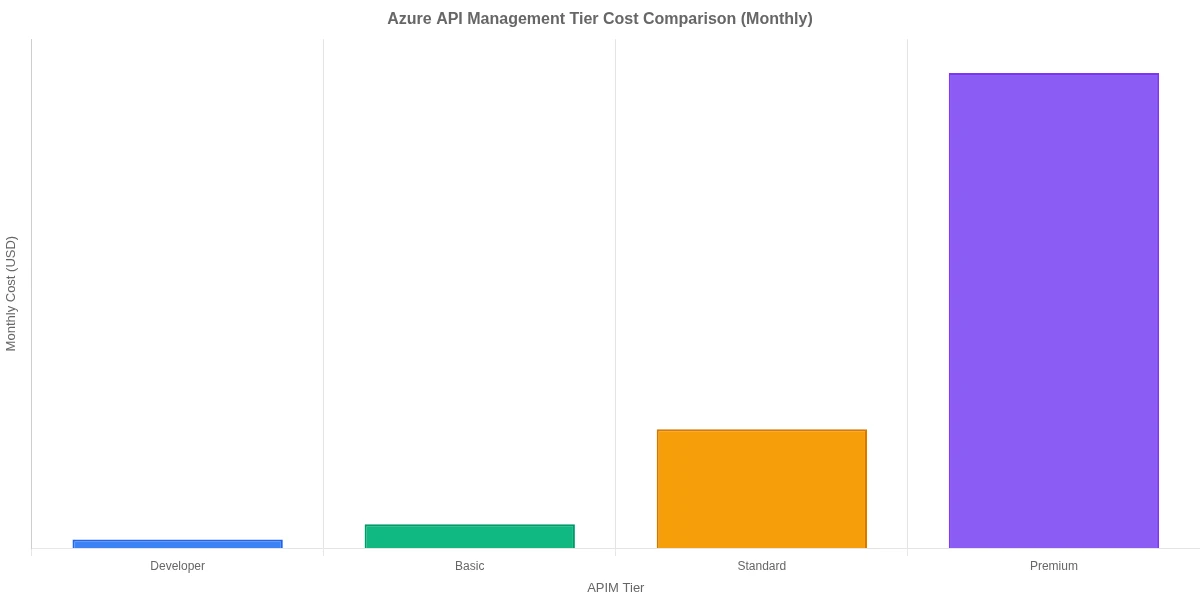
The short answer is that the Developer tier ($50/month) works fine for non-production environments but does not support VNet integration, which PCI-DSS effectively requires. The Basic tier ($140/month) adds SLA coverage but still lacks VNet. The Standard tier ($700/month) is where full network isolation becomes available.
Most startups end up on Standard once they are handling real payment traffic. That is a meaningful line item for an early-stage company, but it replaces a WAF, an API gateway, a developer portal, and a policy engine that would cost considerably more to build and maintain independently.
A few cost controls worth knowing:
APIM bills by the hour, not by call volume. During early development, you can delete and recreate instances to avoid idle costs.
The Consumption tier (pay-per-call, starting at $3.50 per million calls) has no SLA and limited policy support, but it works for internal APIs with very low traffic during prototyping.
Azure Hybrid Benefit applies to APIM if your organization holds eligible Windows Server licenses.
Caching frequently-requested, low-sensitivity API responses inside Azure API Management can reduce backend calls by 30-50%, which directly lowers compute costs.
The comparison that comes up most often for startups evaluating Azure API Management is AWS API Gateway. Both are managed gateway services. The differences matter depending on your existing stack.
Azure API Management strengths for fintech:
Built-in developer portal with OAuth 2.0 self-service subscription management
Policy pipeline with 50+ built-in policies covering JWT validation, IP filtering, caching, and request transformation
Native integration with Azure AD, Azure Monitor, and Application Insights with no additional configuration
Products and subscriptions model built for API monetization
AWS API Gateway strengths:
Simpler pricing model (pay per call, no tier commitment)
Tighter Lambda integration if you are serverless-first on AWS
Slightly lower latency in some regions for pure REST workloads
For a fintech startup already using Azure for compute, storage, and identity (common if you are using Azure AD B2C or Entra ID), Azure API Management wins on integration depth. The OWASP API Security Top 10 applies to both platforms, but APIM's built-in policies cover more of those risk categories out of the box without custom Lambda authorizers.
For Microsoft-aligned shops, Azure API Management also connects to Dynamics 365 and Power Platform through Azure Logic Apps, meaning your payment API can trigger automated approval workflows or compliance notifications without custom middleware. That integration story does not exist in the same way on AWS.
If your team is evaluating cloud-agnostic options or primarily serverless, AWS deserves a fair look. The decision typically comes down to where the rest of your infrastructure lives, not which gateway has the better feature list in isolation.
Conclusion
Azure API Management for fintech startups is not the easiest place to start, but it is the right foundation if your product involves payment APIs, partner integrations, or plans to monetize API access. The five patterns here cover the baseline: OAuth 2.0 security at the gateway, rate limiting that protects both your backend and your business model, PCI-DSS network and logging requirements, a tiered product model for monetization, and versioning that lets you ship changes without breaking existing consumers.
Start with Pattern 1 (OAuth 2.0 and mutual TLS) and Pattern 3 (PCI-DSS configuration) before anything else. A payment API that is not secure and compliant is not a product you can sell. Once those are solid, the monetization and versioning patterns give you the infrastructure to grow into enterprise clients and partner integrations.
If you are ready to design your Azure API Management architecture or need help navigating APIM setup for your specific compliance requirements, get in touch with our team for a technical consultation.
Co-Founder and CTO, QServices IT Solutions Pvt Ltd
Rohit Dabra is the Co-Founder and Chief Technology Officer at QServices, a software development company focused on building practical digital solutions for businesses. At QServices, Rohit works closely with startups and growing businesses to design and develop web platforms, mobile applications, and scalable cloud systems. He is particularly interested in automation and artificial intelligence, building systems that automate routine tasks for teams and organizations.
Azure API Management (APIM) is a fully managed gateway service that sits between client applications and your backend APIs. For fintech startups, it handles authentication (via OAuth 2.0 and JWT validation), rate limiting, analytics, and a self-service developer portal in one place. Every inbound API request passes through a configurable policy pipeline before reaching your backend, which means you can enforce security rules, transform requests, and log activity without writing custom middleware code.
The baseline setup for secure payment APIs on Azure combines three controls: OAuth 2.0 bearer token validation using the APIM validate-jwt policy (with issuer and audience claims pinned), mutual TLS between the APIM gateway and your backend services, and VNet-internal deployment fronted by Azure Application Gateway with WAF enabled. You should also use APIM’s set-body policy to mask Primary Account Numbers (PANs) from logs and error responses before they reach Azure Monitor.
It depends on your compliance requirements. The Developer tier at $50/month works for non-production use but lacks VNet integration. For PCI-DSS-compliant payment APIs, the Standard tier at $700/month is effectively the minimum. That cost replaces a separate WAF, API gateway, developer portal, and policy engine, which collectively would cost more to build and maintain. The Consumption tier (pay-per-call from $3.50 per million calls) is worth considering for very low-traffic internal APIs during early development.
Azure API Management supports several PCI-DSS requirements directly: VNet-internal deployment isolates the gateway from the public internet, TLS 1.0 and 1.1 can be disabled to meet protocol requirements, and diagnostic logs can be routed to Azure Monitor with a 12-month retention policy. Startups must also configure data masking policies to strip PANs from API responses and logs, and front the APIM instance with Azure Application Gateway to get WAF coverage at the network perimeter.
Use Azure API Management’s Products and Subscriptions model to create tiered access plans (for example, free sandbox, $149/month growth, and custom enterprise). Each product tier gets its own rate limit and quota policies. The built-in developer portal handles self-service onboarding and key management. The key gap to plan for: APIM does not process billing automatically, so you need to connect APIM usage data (available via the Azure Management API) to a payment processor like Stripe to charge clients based on their actual consumption.
For fintech startups already using Azure infrastructure (Azure AD B2C, Azure Monitor, Dynamics 365), Azure API Management is the stronger choice because of its native integration depth, built-in developer portal, and 50+ policy types covering security and transformation use cases. AWS API Gateway has simpler per-call pricing and better Lambda integration for serverless-first architectures. The decision usually comes down to where your identity and compute infrastructure already lives rather than the gateway features themselves.
Apply the rate-limit-by-key policy at the product or API level to set per-subscription call limits (for example, 200 calls per minute per API key). Use the quota-by-key policy to add a monthly total cap, which maps directly to pricing tiers. For global backend protection, add a separate rate limit at the API scope that caps all traffic regardless of subscription. Note that APIM counts calls at the gateway layer, meaning failed validation requests (that never reach your backend) still count against a caller’s quota.
Business intelligence consulting services should give a mid-market company a governed way to make decisions. Attractive dashboards are only the visible part. The useful outcome is a system in which source data, metric definitions, access, releases, ownership, and support still work after the consultants leave.
In a Microsoft Solutions Partner vs Microsoft Partner comparison, the difference is validation. A company can participate in the Microsoft AI Cloud Partner Program without holding a customer-facing Solutions Partner designation. A designated Solutions Partner has met Microsoft’s current threshold in a specific solution pathway: at least 70 out of 100 partner capability points, with more than zero points in every required metric, based on performance, skilling, and customer success data recorded in Partner Center.
Business intelligence consulting services should give a mid-market company a governed way to make decisions. Attractive dashboards are only the visible part. The useful outcome is a system in which source data, metric definitions, access, releases, ownership, and support still work after the consultants leave.
In a Microsoft Solutions Partner vs Microsoft Partner comparison, the difference is validation. A company can participate in the Microsoft AI Cloud Partner Program without holding a customer-facing Solutions Partner designation. A designated Solutions Partner has met Microsoft’s current threshold in a specific solution pathway: at least 70 out of 100 partner capability points, with more than zero points in every required metric, based on performance, skilling, and customer success data recorded in Partner Center.